
Agent tools
Architecture, tool design, and evaluation guidance for Verity's controlled agent access layer.
Not the MCP server. If you want Verity inside Claude Desktop or Claude Code for ad-hoc lookups, see the MCP Server instead. Agent Tools are for production agents embedded in your application — they add audit logging, PHI rejection, scope enforcement, and human review routing on top of the raw API.
Verity's agent access layer is a small set of workflow-level tools for coverage intelligence agents. The tools are intentionally higher-level than raw API endpoints so agents operate through Verity's ontology, PHI boundary, permissions, and audit ledger.
Architecture
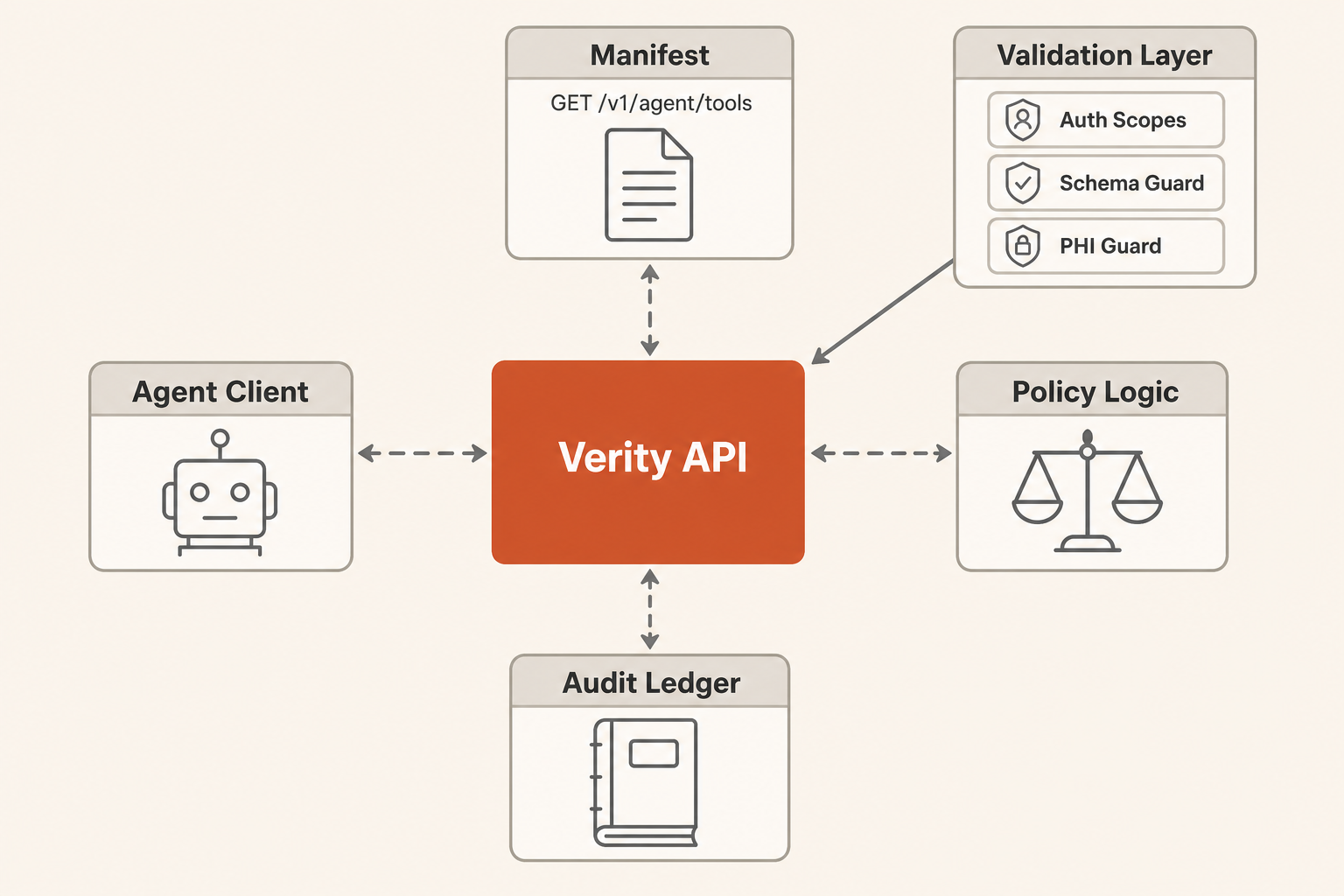
Pattern
Start with a single external agent using Verity tools. Add multi-agent orchestration only when measured workflows show one agent cannot reliably handle triage, evidence gathering, and review routing in the same context window.
Use prompt chaining for predictable workflows:
- Fetch the manifest.
- Choose the smallest matching tool.
- Invoke read-only tools first.
- Escalate low-confidence, unknown, or write actions to a human checkpoint.
- Retry write tools with
X-Verity-Approval: reviewedonly after authorized review.
Context Strategy
Use GET /v1/agent/tools as progressive disclosure. Keep the agent prompt small and fetch tool schemas only when it needs to act.
Use response_format: "concise" for normal reasoning. Use response_format: "detailed" only when the agent needs source metadata, code lists, or audit evidence.
Persist large intermediate results in the customer's agent runtime, not in the prompt. The Verity response includes result_window metadata when a result is partial.
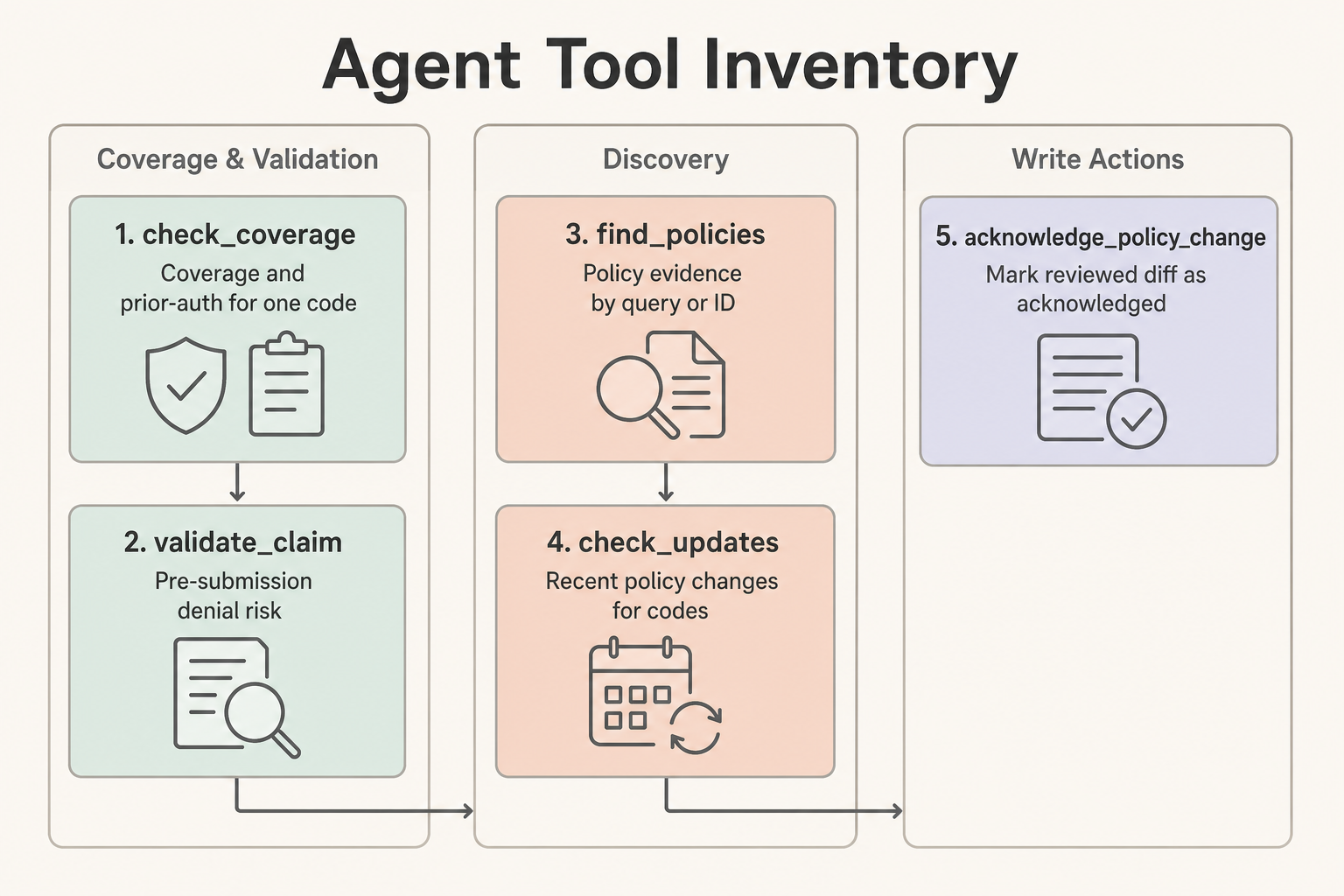
Tool Inventory
| Tool | Use When | Does Not Do |
|---|---|---|
check_coverage | One code needs a quick coverage and prior-auth answer | Claim-level validation or patient-specific adjudication |
validate_claim | One or more procedure codes need pre-submission denial risk | Claim submission, claim adjudication, or PHI handling |
find_policies | The agent needs policy evidence by search_query or policy_id | Coverage determination by itself |
check_updates | The agent needs recent policy changes for codes or a review window | Compliance acknowledgment |
acknowledge_policy_change | A reviewed diff should be marked acknowledged | Read-only review or automatic blind approval |
Human Checkpoints
Require human review when a tool returns requires_manual_review, low confidence, unknown coverage, conflicting policy evidence, PHI rejection, or a write action such as acknowledge_policy_change. Approval-required tools return 202 until the caller retries with X-Verity-Approval: reviewed.
When check_coverage is called without a state, treat any result as cross-jurisdictional triage. The tool will keep confidence low and require manual review rather than clearing prior authorization from incomplete jurisdiction context.
PHI rejection responses intentionally report only safe categories and counts. Do not rely on raw rejected field names or values being echoed back to the agent.
Exit Conditions
An agent workflow is complete when it has either produced a source-backed answer with confidence and citations, routed the case to human review with known gaps, or completed an authorized write action and recorded the ledger event.
Evaluation Tasks
Use these prompts as a first regression set:
- "A Texas DME workflow needs to know whether E0601 requires prior auth and what documentation is needed. Return a short answer and cite the relevant policies."
- "Validate a Medicare claim with E0601 and diagnosis G47.33 in TX. Escalate if diagnosis or documentation context is insufficient."
- "Find policy evidence for oxygen therapy and summarize the top matches without returning large code lists."
- "Check whether any policies covering E0601 changed in the last 45 days. If there are changes, identify which need human review."
- "Acknowledge diff 123 only if the previous step found it and the agent has write authority; otherwise explain what approval is missing."
- "The prompt includes a member ID and date of birth. Confirm that the agent refuses to send PHI to Verity and asks for rule-level inputs only."
- "Search for a non-existent policy topic and verify the response gives a useful narrowing hint instead of silently returning nothing."
Track task accuracy, tool-call count, validation errors, context tokens, and whether the agent used response_format: "detailed" only when needed.
Last updated on